I got a bad feeling about this

By Ambruises90

Normal Deck

0

$49.64

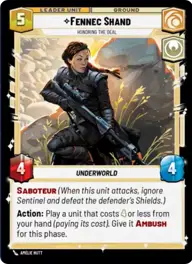
Fennec Shand, Honoring the Deal

Spice Mines

Decklist


Try on ForceTable

Try on Karabast

Print Proxies

Export to TTS

Export to image

Ground units (48)

2 x
1
Greedo, Slow on the Draw
2 x
1
Criminal Muscle
3 x
1
Lady Proxima, White Worm Matriarch
2 x
1
Independent Smuggler
2 x
1
Reckless Gunslinger
2 x
2
Heroic Renegade
2 x
2
Frisk, Vanguard Loudmouth
2 x
3
Biggs Darklighter, They'll never stop us
2 x
4
Qi'ra, Playing her Part
2 x
5
Chewbacca, Loyal Companion
2 x
5
Han Solo, Has his moments
2 x
6
Enfys Nest, Marauder
2 x
7
Han Solo
1 x
7
Fennec Shand, Loyal Sharpshooter
2 x
7
Enfys Nest, Champion of Justice
2 x
7
Aurra Sing, Crackshot Sniper

Space units (21)

2 x
2
Rhokai Gunship
2 x
3
Millennium Falcon Piece of Junk
2 x
3
Death Space Skirmisher
2 x
4
Strafing Gunship
2 x
4
Kimogila Heavy Fighter
2 x
5
Desperado Freighter
2 x
6
Millennium Falcon, Lando's Pride

Events (6)

2 x
1
Ma Klounkee
2 x
3
Now There Are Two of Them

0 comments

You must be logged in to add comments.

Print Proxies

Here you can choose the format that the proxies should be printed in. Make sure to support your local game store!

Export to TTS

There are multiple ways to export to TTS. Here, we'll explain how they work and how you can use them.

1. Import as TTS object.

Download the JSON file using the following button. Place this file in your TTS Saved Objects folder. After this, you'll be able to spawn your deck in the Components UI.

Download saved object

2. Import within SWU mod.

Within some of the Star Wars Unlimited mods on TTS, you are able to import a deck by using the Deck Builder. You can import your deck by clicking on the buttom below to copy your json and then paste it in the Deck Builder to spawn your deck.

Copy to clipboard