Tico Monster

By WIZARD182

Normal Deck

0

$6.74

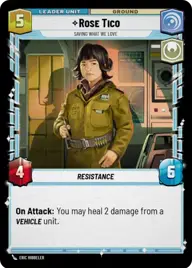
Rose Tico, Saving What We Love

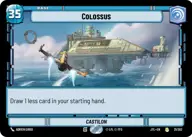
Colossus

Decklist


Try on ForceTable

Try on Karabast

Print Proxies

Export to TTS

Export to image

Ground units (33)

2 x
1
Astromech Pilot
2 x
1
2-1B Surgical Droid
3 x
2
Hera Syndulla, We've lost enough
2 x
2
Echo Base Engineer
2 x
2
Kuil, I have spoken
2 x
2
Paige Tico, Dropping the Hammer
1 x
2
Academy Graduate
2 x
3
Trace Martez, Trusting Sister
1 x
3
Oggdo Bogdo, Bogano Brute
1 x
4
Hondo Ohnaka, Superfluous Swindler
2 x
6
Cargo Juggernaut

Space units (18)

2 x
2
Silver Angel, Trace's Hope
3 x
2
Restored ARC-170
3 x
3
Red Squadron X-Wing
2 x
5
Obi-Wan's Aethersprite, This is why I hate flying
2 x
6
Gold Leader, Fastest Ship in the Fleet
1 x
8
Redemption, Medical Frigate

Events (18)

3 x
1
Covert Strength
1 x
1
Repair
1 x
1
I have the High Ground
1 x
2
Midnight Repairs
2 x
2
Guarding the Way
2 x
3
Equalize

Upgrades (9)

2 x
1
Protector
2 x
1
Resilient
3 x
4
Unshakeable Will

0 comments

You must be logged in to add comments.

Print Proxies

Here you can choose the format that the proxies should be printed in. Make sure to support your local game store!

Export to TTS

There are multiple ways to export to TTS. Here, we'll explain how they work and how you can use them.

1. Import as TTS object.

Download the JSON file using the following button. Place this file in your TTS Saved Objects folder. After this, you'll be able to spawn your deck in the Components UI.

Download saved object

2. Import within SWU mod.

Within some of the Star Wars Unlimited mods on TTS, you are able to import a deck by using the Deck Builder. You can import your deck by clicking on the buttom below to copy your json and then paste it in the Deck Builder to spawn your deck.

Copy to clipboard