I’m a big deal in the resistance

By Anonymous

Normal Deck

0

$66.19

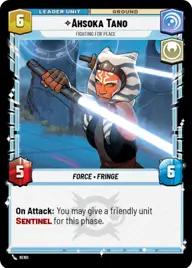
Ahsoka Tano, Fighting for peace

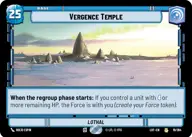
Vergence Temple

Decklist


Try on ForceTable

Try on Karabast

Print Proxies

Export to TTS

Export to image

Ground units (54)

3 x
1
R2-D2
3 x
2
C-3PO
1 x
2
Yaddle, A chance to make things right
3 x
3
Yoda, Old Master
3 x
3
Ezra Bridger, Attuned with Life
3 x
4
Consular Security Force
3 x
4
Kanan Jarrus, Revealed Jedi
2 x
4
Sugi, Hired Guardian
3 x
4
Dume, Redeem the Future
3 x
4
Itinerant Warrior
3 x
6
Cargo Juggernaut
3 x
6
Bendu, The One In The Middle
2 x
6
Knight of the Republic
2 x
7
Luke Skywalker, Jedi Knight
2 x
7
Tarfful, Kashyyyk Chieftain
1 x
8
The Father, Maintaining Balance
2 x
9
The Zillo Beast, Awoken from the Depths
1 x
9
Mythosaur, Folklore Awakened

Space units (21)

3 x
3
Concord Dawn Interceptors
3 x
3
T-6 Shuttle 1974, Stay Close
2 x
5
Obi-Wan's Aethersprite, This is why I hate flying
3 x
6
The Ghost, Spectre Home Base
3 x
6
Gold Leader, Fastest Ship in the Fleet
2 x
6
CR90 Relief Runner
2 x
7
Grappling Guardian

Events (3)

2 x
6
Rival's Fall

0 comments

You must be logged in to add comments.

Print Proxies

Here you can choose the format that the proxies should be printed in. Make sure to support your local game store!

Export to TTS

There are multiple ways to export to TTS. Here, we'll explain how they work and how you can use them.

1. Import as TTS object.

Download the JSON file using the following button. Place this file in your TTS Saved Objects folder. After this, you'll be able to spawn your deck in the Components UI.

Download saved object

2. Import within SWU mod.

Within some of the Star Wars Unlimited mods on TTS, you are able to import a deck by using the Deck Builder. You can import your deck by clicking on the buttom below to copy your json and then paste it in the Deck Builder to spawn your deck.

Copy to clipboard