Dank farrik

By Anonymous

Normal Deck

0

$48.58

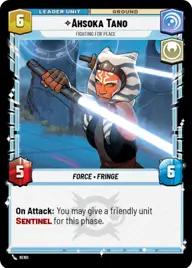
Ahsoka Tano, Fighting for peace

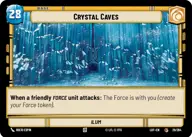
Crystal Caves

Decklist


Try on ForceTable

Try on Karabast

Print Proxies

Export to TTS

Export to image

Ground units (54)

3 x
1
Refugee of the Path
2 x
1
Anakin Skywalker, Force Prodigy
3 x
2
Secretive Sage
3 x
2
Yaddle, A chance to make things right
3 x
2
Youngling Padawan
2 x
3
Yoda, Old Master
2 x
3
Grogu, Mysterious Child
2 x
3
Vernestra Rwoh, Precocious Knight
1 x
4
Kanan Jarrus, Revealed Jedi
1 x
4
Jedi Sentinel
2 x
4
Itinerant Warrior
3 x
4
Chirrut Îmwe, Blind, but not Deaf
1 x
4
Ahsoka Tano, Chasing Whispers
3 x
5
Jedi Guardian
1 x
6
Anakin Skywalker, Champion of Mortis
1 x
6
Plo Koon, I don't believe in chance
1 x
7
Priestesses of the Force, Eternal
1 x
7
Luminara Unduli, Soft-Spoken Master

Space units (3)

3 x
2
Padawan Starfighter

Events (18)

3 x
1
Mystic Reflection
3 x
1
Moment of Peace
1 x
2
It Binds All Things
2 x
3
Make An Opening
2 x
4
Shatterpoint
1 x
4
Grassroots Resistance

Upgrades (6)

1 x
1
Jedi Holocron
2 x
2
Heirloom Lightsaber

0 comments

You must be logged in to add comments.

Print Proxies

Here you can choose the format that the proxies should be printed in. Make sure to support your local game store!

Export to TTS

There are multiple ways to export to TTS. Here, we'll explain how they work and how you can use them.

1. Import as TTS object.

Download the JSON file using the following button. Place this file in your TTS Saved Objects folder. After this, you'll be able to spawn your deck in the Components UI.

Download saved object

2. Import within SWU mod.

Within some of the Star Wars Unlimited mods on TTS, you are able to import a deck by using the Deck Builder. You can import your deck by clicking on the buttom below to copy your json and then paste it in the Deck Builder to spawn your deck.

Copy to clipboard