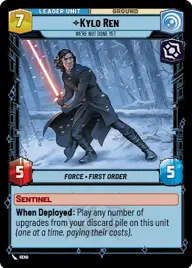
Kylo

By Cj da beast

Normal Deck

0

$27.81

Kylo Ren, We're not done yet

Maz Kanata's Castle

Decklist


Try on ForceTable

Try on Karabast

Print Proxies

Export to TTS

Export to image

Ground units (63)

2 x
1
Hylobon Enforcer
1 x
2
Admiral Piett, Captain of the Executor
3 x
2
Pyke Sentinel
1 x
2
Guardian of the Whills
1 x
2
General Tagge, Concerned Commander
2 x
3
Cell Block Guard
3 x
3
Superlaser Technician
2 x
3
Cloud City Wing Guard
2 x
4
Niima Outpost Constables
1 x
4
Perimeter AT-RT
1 x
4
Chirrut Îmwe, Blind, but not Deaf
1 x
4
Awakened Specters
1 x
4
Jedi Temple Guards
1 x
5
B2 Legionnaires
1 x
5
Old Daka, Oldest and Wisest
2 x
5
Discerning Veteran
1 x
5
Supercommando Squad
1 x
6
Army of the Dead
1 x
6
Fenn Rau, Protector of Concord Dawn
1 x
6
Cargo Juggernaut
1 x
6
Eighth Brother, Hunt Together

Space units (15)

1 x
2
Onyx Squadron Brute
3 x
3
HWK-290 Freighter
3 x
3
Landing Shuttle
1 x
3
Hive Defense Wing
1 x
4
Kihraxz Heavy Fighter

Upgrades (18)

1 x
1
Resilient
2 x
1
Foundling
2 x
1
Strategic Acumen
3 x
2
Vambrace Grappleshot
2 x
3
Constructed Lightsaber
1 x
4
The Darksaber

0 comments

You must be logged in to add comments.

Print Proxies

Here you can choose the format that the proxies should be printed in. Make sure to support your local game store!

Export to TTS

There are multiple ways to export to TTS. Here, we'll explain how they work and how you can use them.

1. Import as TTS object.

Download the JSON file using the following button. Place this file in your TTS Saved Objects folder. After this, you'll be able to spawn your deck in the Components UI.

Download saved object

2. Import within SWU mod.

Within some of the Star Wars Unlimited mods on TTS, you are able to import a deck by using the Deck Builder. You can import your deck by clicking on the buttom below to copy your json and then paste it in the Deck Builder to spawn your deck.

Copy to clipboard