Appetite for Destruction

By Anonymous

Normal Deck

0

$8.38

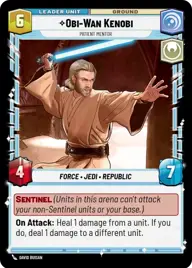
Obi-Wan Kenobi, Patient Mentor

Sundari

Decklist


Try on ForceTable

Try on Karabast

Print Proxies

Export to TTS

Export to image

Ground units (27)

3 x
1
Warrior Drone
1 x
2
Outspoken Representative
1 x
2
Echo Base Engineer
1 x
3
Trace Martez, Trusting Sister
2 x
3
Phase II Clone Trooper
1 x
4
Daughter of Dathomir
2 x
5
Retrofitted Airspeeder
3 x
6
Armored Saber Tank
2 x
6
Knight of the Republic

Space units (27)

1 x
2
Headhunter Squadron
3 x
2
Silver Angel, Trace's Hope
2 x
2
Padawan Starfighter
2 x
3
Flanking Fang Fighter
2 x
3
Red Squadron X-Wing
1 x
5
Corelian Freighter
3 x
5
Obi-Wan's Aethersprite, This is why I hate flying
1 x
6
CR90 Relief Runner
3 x
7
Tranquility, Inspiring Flagship

Events (15)

3 x
1
Hold-Out Blaster
3 x
2
You're all clear, Kid
2 x
2
Sword and Shield Maneuver
1 x
3
Hello There
2 x
5
Out the Airlock

Upgrades (12)

3 x
2
Luke's Lightsaber
2 x
3
Moral Authority
3 x
3
Jedi Lightsaber
2 x
3
The Mandalorian's Rifle

0 comments

You must be logged in to add comments.

Print Proxies

Here you can choose the format that the proxies should be printed in. Make sure to support your local game store!

Export to TTS

There are multiple ways to export to TTS. Here, we'll explain how they work and how you can use them.

1. Import as TTS object.

Download the JSON file using the following button. Place this file in your TTS Saved Objects folder. After this, you'll be able to spawn your deck in the Components UI.

Download saved object

2. Import within SWU mod.

Within some of the Star Wars Unlimited mods on TTS, you are able to import a deck by using the Deck Builder. You can import your deck by clicking on the buttom below to copy your json and then paste it in the Deck Builder to spawn your deck.

Copy to clipboard