I’m a big deal in the resistance

By Anonymous

Normal Deck

0

$76.00

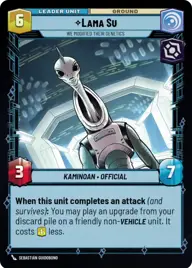
Lama Su, We modified their genetics

Maz Kanata's Castle

Decklist


Try on ForceTable

Try on Karabast

Print Proxies

Export to TTS

Export to image

Ground units (33)

3 x
0
Porg
3 x
1
Hylobon Enforcer
3 x
2
Follower of The Way
3 x
2
Doctor Pershing, Experimenting with Life
2 x
2
Lobot, Cloud City Coordinator
1 x
2
Lost Jedi
2 x
2
Trayus Acolyte
2 x
2
Zam Wesell, Inconspicuous Assassin
3 x
3
Wroshyr Tree Tender
3 x
4
Baze Malbus, Temple Guardian
1 x
7
Lando Calrissian, Trust Me

Space units (9)

3 x
2
Royal Security Fighter
3 x
7
First Light, Headquarters of the Crimson Dawn
3 x
9
Avenger, Hunting Star Destroyer

Events (3)

3 x
3
Power of the Dark Side

Upgrades (12)

3 x
2
Darth Revan's Lightsabers
3 x
2
Academy Training
3 x
3
General's Blade
3 x
3
Constructed Lightsaber

0 comments

You must be logged in to add comments.

Print Proxies

Here you can choose the format that the proxies should be printed in. Make sure to support your local game store!

Export to TTS

There are multiple ways to export to TTS. Here, we'll explain how they work and how you can use them.

1. Import as TTS object.

Download the JSON file using the following button. Place this file in your TTS Saved Objects folder. After this, you'll be able to spawn your deck in the Components UI.

Download saved object

2. Import within SWU mod.

Within some of the Star Wars Unlimited mods on TTS, you are able to import a deck by using the Deck Builder. You can import your deck by clicking on the buttom below to copy your json and then paste it in the Deck Builder to spawn your deck.

Copy to clipboard