Knowledge and Defense

By Anonymous

Normal Deck

0

$4.96

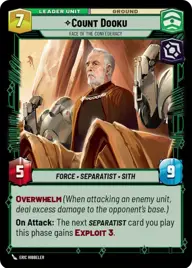
Count Dooku, Face of the Confederacy

Remote Village

Decklist


Try on ForceTable

Try on Karabast

Print Proxies

Export to TTS

Export to image

Ground units (51)

3 x
1
Curious Flock
1 x
1
Sullustan Spacer
1 x
1
Supreme Council Aide
1 x
1
Astromech Pilot
1 x
2
Wartime Trade Official
1 x
2
Malakili, Loving Rancor Keeper
1 x
3
Super Battle Droid
1 x
3
Huyang, Enduring Instructor
2 x
4
Ando Commission
1 x
5
Patrolling AAT
1 x
5
Raxian Assembly
1 x
5
Discerning Veteran
3 x
6
Droideka Security
2 x
7
Multi-Troop Transport
2 x
8
Hailfire Tank
1 x
8
Jabba's Rancor, Pateesa
1 x
9
Separatist Super Tank

Space units (39)

1 x
1
First Order TIE Fighter
1 x
1
Droid Starfighter
2 x
2
Confederate Courier
2 x
2
Swarming Vulture Droid
1 x
3
Hive Defense Wing
1 x
3
Supremacy TIE/sf
2 x
8
Providence Destroyer
3 x
8
The Invisible Hand, Imposing Flagship
2 x
9
Malevolence, Grievous's Secret Weapon

Events (24)

1 x
1
Altering the Deal
2 x
1
Tandem Assault
3 x
2
Droid Deployment
1 x
2
Grievous Reassembly
1 x
2
Contempt For Culture
2 x
3
Take Captive
2 x
5
Retaliation
1 x
5
Vanquish

Upgrades (3)

2 x
3
Perilous Position

0 comments

You must be logged in to add comments.

Print Proxies

Here you can choose the format that the proxies should be printed in. Make sure to support your local game store!

Export to TTS

There are multiple ways to export to TTS. Here, we'll explain how they work and how you can use them.

1. Import as TTS object.

Download the JSON file using the following button. Place this file in your TTS Saved Objects folder. After this, you'll be able to spawn your deck in the Components UI.

Download saved object

2. Import within SWU mod.

Within some of the Star Wars Unlimited mods on TTS, you are able to import a deck by using the Deck Builder. You can import your deck by clicking on the buttom below to copy your json and then paste it in the Deck Builder to spawn your deck.

Copy to clipboard