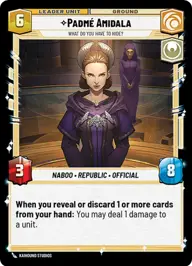
Padmé blue

By augustotobias

Normal Deck

0

$0.00

Padmé Amidala, What do you have to hide

Uscru Entertainment District

Decklist


Try on ForceTable

Try on Karabast

Print Proxies

Export to TTS

Export to image

Ground units (27)

3 x
1
Furtive Handmaiden
1 x
1
B2emo, That's Two Lies
3 x
2
Chandrilan Sponsor
3 x
3
Anakin Skywalker, Secret Husband
2 x
3
Hired Slicer
2 x
3
Cikatro Vizago, Business Is What Matters
3 x
5
Duchess's Investigators
2 x
5
Nala Se, Chief Medical Scientist
1 x
9
Bo-Katan Kryze, Alone

Space units (15)

3 x
2
Bravo Squadron Fighter
3 x
3
Defense Fleet X-Wing
3 x
4
Bardottan Ornithopter
2 x
6
Jade Squadron Patrol
1 x
7
Vigil, Securing The Future

Events (18)

2 x
2
Charged With Espionage
3 x
2
Faith In Your Friends
3 x
2
Relief Request
3 x
3
Bog Down In Procedure
2 x
4
Charged With Murder
2 x
4
Grassroots Resistance

Upgrades (3)

3 x
2
Diplomatic Immunity

0 comments

You must be logged in to add comments.

Print Proxies

Here you can choose the format that the proxies should be printed in. Make sure to support your local game store!

Export to TTS

There are multiple ways to export to TTS. Here, we'll explain how they work and how you can use them.

1. Import as TTS object.

Download the JSON file using the following button. Place this file in your TTS Saved Objects folder. After this, you'll be able to spawn your deck in the Components UI.

Download saved object

2. Import within SWU mod.

Within some of the Star Wars Unlimited mods on TTS, you are able to import a deck by using the Deck Builder. You can import your deck by clicking on the buttom below to copy your json and then paste it in the Deck Builder to spawn your deck.

Copy to clipboard