ani green

By hi

Normal Deck

0

$38.70

Anakin Skywalker, What it takes to win
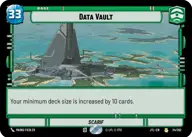
Data Vault

Decklist


Try on ForceTable

Try on Karabast

Print Proxies

Export to TTS

Export to image

Ground units (48)

3 x
1
Soldier of the 501st
3 x
1
Village Tender
1 x
2
Battlefield Marine
3 x
2
Gungi, Finding Himself
3 x
2
Adi Gallia, Stern and Focused
3 x
2
Mina Bonteri, Stop This War
2 x
2
Karis Nemik, Freedom Is A Pure Idea
3 x
3
Sundari Peacekeeper
3 x
3
Cassian Andor, Rebellions are built on Hope
1 x
3
Gungan Warrior
3 x
3
Ahsoka Tano, I Learned It From You
2 x
4
K-2SO
3 x
5
Queen Amidala, Championing Her People
2 x
6
Guerilla Attack Pod
2 x
6
Cinta Kaz, The Struggle Comes First
1 x
7
Kelleran Beq, The Sabered Hand

Space units (21)

1 x
2
Green Squadron A-Wing
3 x
2
Anakin's Interceptor, Where the Fun Begins
3 x
2
Jedi Starfighter
2 x
3
Sabine's Masterpiece, Crazy Colorful
2 x
3
Hive Defense Wing
3 x
5
Tactical Heavy Bomber
3 x
6
Red Squadron Y-Wing

Events (6)

3 x
3
Open Fire
2 x
7
U-Wing Reinforcement

0 comments

You must be logged in to add comments.

Print Proxies

Here you can choose the format that the proxies should be printed in. Make sure to support your local game store!

Export to TTS

There are multiple ways to export to TTS. Here, we'll explain how they work and how you can use them.

1. Import as TTS object.

Download the JSON file using the following button. Place this file in your TTS Saved Objects folder. After this, you'll be able to spawn your deck in the Components UI.

Download saved object

2. Import within SWU mod.

Within some of the Star Wars Unlimited mods on TTS, you are able to import a deck by using the Deck Builder. You can import your deck by clicking on the buttom below to copy your json and then paste it in the Deck Builder to spawn your deck.

Copy to clipboard