Through the night, our deliverance

By yellowsnoman15

Normal Deck

0

$30.62

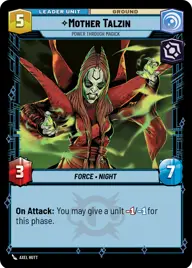
Mother Talzin, Power Through Magick

Strangled Cliffs

Decklist


Try on ForceTable

Try on Karabast

Print Proxies

Export to TTS

Export to image

Ground units (54)

3 x
1
Witch of the Mist
1 x
1
Moisture Farmer
1 x
1
Disaffected Senator
1 x
2
Karis, We don't like strangers
3 x
2
Nightsister Warrior
3 x
2
Infused Brawler
1 x
2
Guardian of the Whills
1 x
3
Merrin, Alone with the dead
1 x
3
Death Watch Loyalist
3 x
4
Daughter of Dathomir
1 x
4
Talzin's Assassin
1 x
4
Awakened Specters
1 x
4
Cham Syndulla, Rallying Ryloth
1 x
5
Old Daka, Oldest and Wisest
3 x
5
Thralls of the Coven
2 x
5
Asajj Ventress, Harden your Heart
2 x
5
Darth Maul, Revenge At Last
1 x
7
Savage Opress, Monster

Space units (18)

14 x
2
Swarming Vulture Droid
1 x
7
First Light, Headquarters of the Crimson Dawn

Events (21)

1 x
1
Force Lightning
1 x
1
Corner the Prey
1 x
1
Hold-Out Blaster
1 x
2
Keep Fighting
1 x
3
Disruptive Burst
1 x
4
Fell the Dragon
1 x
5
Bombing Run

Upgrades (9)

3 x
1
Ruthlessness
2 x
2
Devotion
1 x
4
Unshakeable Will

0 comments

You must be logged in to add comments.

Print Proxies

Here you can choose the format that the proxies should be printed in. Make sure to support your local game store!

Export to TTS

There are multiple ways to export to TTS. Here, we'll explain how they work and how you can use them.

1. Import as TTS object.

Download the JSON file using the following button. Place this file in your TTS Saved Objects folder. After this, you'll be able to spawn your deck in the Components UI.

Download saved object

2. Import within SWU mod.

Within some of the Star Wars Unlimited mods on TTS, you are able to import a deck by using the Deck Builder. You can import your deck by clicking on the buttom below to copy your json and then paste it in the Deck Builder to spawn your deck.

Copy to clipboard