This is the way

By Anonymous

Normal Deck

0

$79.05

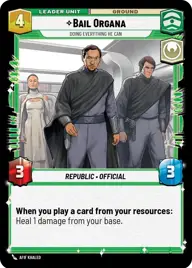
Bail Organa, Doing everything he can

Rix Road

Decklist


Try on ForceTable

Try on Karabast

Print Proxies

Export to TTS

Export to image

Ground units (36)

2 x
2
Orn Free Taa, Political Power Broker
2 x
2
Chandrilan Sponsor
3 x
2
Mina Bonteri, Stop This War
1 x
2
Cassian Andor, Lay Low
3 x
3
Village Protectors
3 x
3
Chancellor Palpatine, I Am The Senate
3 x
4
Galen Erso, You'll Never Win
3 x
5
Queen Amidala, Championing Her People
3 x
6
Anakin Skywalker, Champion of Mortis
1 x
7
Lando Calrissian, Trust Me
3 x
7
Kelleran Beq, The Sabered Hand
1 x
9
Bo-Katan Kryze, Alone

Space units (12)

3 x
2
Phoenix Squadron A-Wing
2 x
3
Blue Leader, Scarif Air Support
2 x
4
Naboo Royal Starship, Fit For A Queen
2 x
8
Home One, Alliance Flagship

Events (21)

1 x
1
Timely Intervention
2 x
1
Confiscate
1 x
2
Trade Route Taxation
2 x
3
Charged With Corruption
1 x
4
Fell the Dragon
3 x
5
Vanquish
1 x
7
Hyperspace Disaster

Upgrades (3)

2 x
4
Unveiled Might

0 comments

You must be logged in to add comments.

Print Proxies

Here you can choose the format that the proxies should be printed in. Make sure to support your local game store!

Export to TTS

There are multiple ways to export to TTS. Here, we'll explain how they work and how you can use them.

1. Import as TTS object.

Download the JSON file using the following button. Place this file in your TTS Saved Objects folder. After this, you'll be able to spawn your deck in the Components UI.

Download saved object

2. Import within SWU mod.

Within some of the Star Wars Unlimited mods on TTS, you are able to import a deck by using the Deck Builder. You can import your deck by clicking on the buttom below to copy your json and then paste it in the Deck Builder to spawn your deck.

Copy to clipboard