Knowledge and Defense

By Kylostark85

Normal Deck

0

$22.45

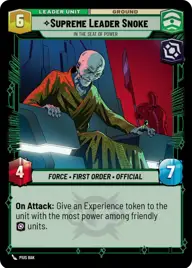
Supreme Leader Snoke, In the Seat of Power

Uscru Entertainment District

Decklist


Try on ForceTable

Try on Karabast

Print Proxies

Export to TTS

Export to image

Ground units (39)

3 x
1
Corrupt Politician
2 x
2
Director Krennic, On the Verge of Greatness
3 x
2
Vaneé, I live to serve
3 x
2
Imperial Dark Trooper
3 x
2
Major Partagaz, Healthcare Provider
3 x
3
Praetorian Guard
3 x
3
Nute Gunray, Escaping Justice
3 x
3
Chancellor Palpatine, I Am The Senate
3 x
4
Sly Moore, Witness To Power
3 x
4
Vice Admiral Rampart, On Schedule
3 x
4
Mas Amedda, Accomplice To Power
3 x
6
Dedra Meero, With Verifiable Data
2 x
7
Lando Calrissian, Trust Me

Space units (3)

2 x
8
PreMor Personnel Carrier

Events (12)

2 x
1
Emergency Powers
2 x
2
Budget Scheming
2 x
3
Charged With Corruption
2 x
3
With Thunderous Applause

Upgrades (3)

3 x
5
Craving Power

0 comments

You must be logged in to add comments.

Print Proxies

Here you can choose the format that the proxies should be printed in. Make sure to support your local game store!

Export to TTS

There are multiple ways to export to TTS. Here, we'll explain how they work and how you can use them.

1. Import as TTS object.

Download the JSON file using the following button. Place this file in your TTS Saved Objects folder. After this, you'll be able to spawn your deck in the Components UI.

Download saved object

2. Import within SWU mod.

Within some of the Star Wars Unlimited mods on TTS, you are able to import a deck by using the Deck Builder. You can import your deck by clicking on the buttom below to copy your json and then paste it in the Deck Builder to spawn your deck.

Copy to clipboard