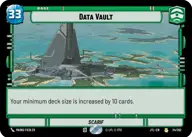
Luke Data Vault

By Peterz

Normal Deck

1

$7.87

Luke Skywalker, Hero of Yavin

Data Vault

Decklist


Try on ForceTable

Try on Karabast

Print Proxies

Export to TTS

Export to image

Ground units (42)

1 x
1
Massassi Tactical Officer
2 x
1
Warzone Lieutenant
3 x
1
Alliance Dispatcher
3 x
2
Rebel Pathfinder
2 x
2
Hopeful Volunteer
3 x
2
Clone Pilot
3 x
2
House Kast Soldier
3 x
3
Fleet Lieutenant
3 x
3
Ardent Sympathizer
1 x
3
Maz Kanata, The Light Guides
2 x
3
Jedi Knight
1 x
3
Biggs Darklighter, They'll never stop us
1 x
5
Relic Scavenger
2 x
5
B2 Legionnaires

Space units (27)

3 x
2
Resistance X-Wing
2 x
2
Supporting Eta-2
2 x
2
Rhokai Gunship
3 x
3
Disabling Fang Fighter
3 x
3
Hyena Bomber
1 x
4
Heroic Arc-170
2 x
4
Adept ARC-170
1 x
4
Kihraxz Heavy Fighter
2 x
6
Red Squadron Y-Wing

Events (15)

1 x
2
Prepare for Takeoff
1 x
2
Stay on Target
2 x
2
Coordinated Front
3 x
3
Resupply
1 x
3
Piercing Shot

Upgrades (6)

2 x
2
Twin Laser Turret
1 x
2
Legal Authority

0 comments

You must be logged in to add comments.

Print Proxies

Here you can choose the format that the proxies should be printed in. Make sure to support your local game store!

Export to TTS

There are multiple ways to export to TTS. Here, we'll explain how they work and how you can use them.

1. Import as TTS object.

Download the JSON file using the following button. Place this file in your TTS Saved Objects folder. After this, you'll be able to spawn your deck in the Components UI.

Download saved object

2. Import within SWU mod.

Within some of the Star Wars Unlimited mods on TTS, you are able to import a deck by using the Deck Builder. You can import your deck by clicking on the buttom below to copy your json and then paste it in the Deck Builder to spawn your deck.

Copy to clipboard