I have the high ground!

By Anonymous

Normal Deck

0

$31.53

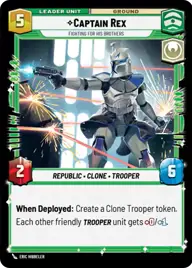
Captain Rex, Fighting for his Brothers

Kestro City

Decklist


Try on ForceTable

Try on Karabast

Print Proxies

Export to TTS

Export to image

Ground units (33)

2 x
2
Echo, Valiant ARC Trooper
2 x
2
Sabine Wren, Explosives Artist
2 x
3
Ahsoka Tano, I Learned It From You
2 x
3
Tech, Source of Insight
2 x
4
Echo, Restored
2 x
4
Hevy, Staunch Martyr
2 x
5
Clone Commander Cody, Commanding the 212th
2 x
5
Anakin Skywalker, Maverick Mentor
1 x
5
Zeb Orrelios, Headstrong Warrior
2 x
6
Captain Rex, Lead by Example
3 x
7
97th Legion, Keeping the Peace on Sullust

Space units (24)

2 x
2
Anakin's Interceptor, Where the Fun Begins
2 x
2
Cavern Angels X-Wing
2 x
2
Green Squadron A-Wing
2 x
3
Red Five, Running the Trench
2 x
3
Sabine's Masterpiece, Crazy Colorful
3 x
6
Resupply Carrier
2 x
7
Tranquility, Inspiring Flagship
1 x
10
Resolute, Under Anakin's Command

Events (12)

2 x
1
Recruit
3 x
3
Resupply
2 x
3
Open Fire
1 x
5
Bombing Run

Upgrades (6)

2 x
1
Ahsoka's Padawan Lightsaber
2 x
5
Traitorous

0 comments

You must be logged in to add comments.

Print Proxies

Here you can choose the format that the proxies should be printed in. Make sure to support your local game store!

Export to TTS

There are multiple ways to export to TTS. Here, we'll explain how they work and how you can use them.

1. Import as TTS object.

Download the JSON file using the following button. Place this file in your TTS Saved Objects folder. After this, you'll be able to spawn your deck in the Components UI.

Download saved object

2. Import within SWU mod.

Within some of the Star Wars Unlimited mods on TTS, you are able to import a deck by using the Deck Builder. You can import your deck by clicking on the buttom below to copy your json and then paste it in the Deck Builder to spawn your deck.

Copy to clipboard