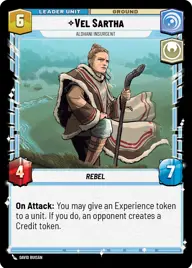
Vel Sartha Red

By Seregil

Normal Deck

0

$5.47

Vel Sartha, Aldhani Insurgent

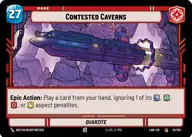
Contested Caverns

Decklist


Try on ForceTable

Try on Karabast

Print Proxies

Export to TTS

Export to image

Ground units (36)

3 x
1
Inspired Recruit
1 x
2
Bodhi Rook, Creating A Diversion
3 x
2
Outer Rim Constable
2 x
2
Chopper, Spectre Three
3 x
3
Arvel Skeen, Win And Walk Away
2 x
3
Cinta Kaz, Stone Cold And Fearless
3 x
3
Axe Woves, Accomplished Warrior
2 x
3
Lieutenant Gorn, I Deserve Worse
1 x
5
Lando Calrissian, Eyes Open
2 x
5
K-2S0, Locking The Vault
2 x
6
Chirrut Îmwe, I Don't Need Luck
2 x
7
Baze Malbus, Good Luck

Space units (15)

3 x
2
Alkenzi Patroller
2 x
5
Shielded Hauler
2 x
5
Blockade Runner
2 x
7
Tantive IV, Carrying Hope
1 x
8
Liberty, Draw Their Fire!

Events (12)

3 x
1
From A Certain Point Of View
3 x
3
Attack From All Sides
2 x
4
The Tree Remembers
2 x
6
Lost And Forgotten

Upgrades (6)

3 x
3
"Staccato Lightning" Repeater
2 x
4
Mastery

0 comments

You must be logged in to add comments.

Print Proxies

Here you can choose the format that the proxies should be printed in. Make sure to support your local game store!

Export to TTS

There are multiple ways to export to TTS. Here, we'll explain how they work and how you can use them.

1. Import as TTS object.

Download the JSON file using the following button. Place this file in your TTS Saved Objects folder. After this, you'll be able to spawn your deck in the Components UI.

Download saved object

2. Import within SWU mod.

Within some of the Star Wars Unlimited mods on TTS, you are able to import a deck by using the Deck Builder. You can import your deck by clicking on the buttom below to copy your json and then paste it in the Deck Builder to spawn your deck.

Copy to clipboard