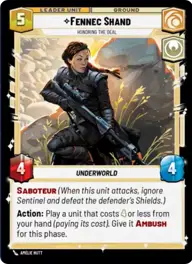
Fennec Sealed Test

By sudvicious

Normal Deck

1

$7.08

Fennec Shand, Honoring the Deal

Dagobah Swamp

Decklist


Try on ForceTable

Try on Karabast

Print Proxies

Export to TTS

Export to image

Ground units (36)

2 x
1
Moisture Farmer
2 x
1
Criminal Muscle
1 x
2
Kuil, I have spoken
1 x
3
Embo, Stoic and Resolute
2 x
3
Frontier Trader
1 x
3
Wroshyr Tree Tender
2 x
3
Liberated Slaves
2 x
4
Niima Outpost Constables
2 x
4
Wookiee Warrior
1 x
5
Resourceful Pursuers
2 x
6
Gentle Giant
2 x
7
Fennec Shand, Loyal Sharpshooter

Space units (27)

2 x
1
Cartel Turncoat
2 x
2
Grey Squadron Y-Wing
2 x
2
Rickety Quadjumper
2 x
2
Privateer Scyk
2 x
3
HWK-290 Freighter
2 x
3
Twin Pod Cloud Car
1 x
3
Concord Dawn Interceptors
2 x
4
Razor Crest, Reliable Gunship
1 x
5
Survivors' Gauntlet

Events (24)

1 x
1
Unexpected Escape
1 x
1
Covert Strength
2 x
2
A New Adventure
1 x
2
Midnight Repairs
1 x
3
Spare the Target
1 x
3
Evidence of the Crime
2 x
4
Fell the Dragon
2 x
6
Rival's Fall

Upgrades (6)

2 x
0
Public Enemy
1 x
2
Jetpack

0 comments

You must be logged in to add comments.

Print Proxies

Here you can choose the format that the proxies should be printed in. Make sure to support your local game store!

Export to TTS

There are multiple ways to export to TTS. Here, we'll explain how they work and how you can use them.

1. Import as TTS object.

Download the JSON file using the following button. Place this file in your TTS Saved Objects folder. After this, you'll be able to spawn your deck in the Components UI.

Download saved object

2. Import within SWU mod.

Within some of the Star Wars Unlimited mods on TTS, you are able to import a deck by using the Deck Builder. You can import your deck by clicking on the buttom below to copy your json and then paste it in the Deck Builder to spawn your deck.

Copy to clipboard