Proxies

By Hinaxen

Normal Deck

0

$199.46

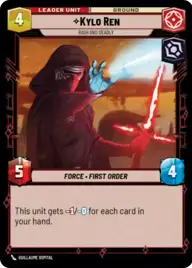
Kylo Ren, Rash and Deadly

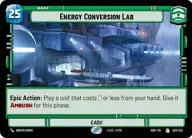
Energy Conversion Lab

Decklist


Try on ForceTable

Try on Karabast

Print Proxies

Export to TTS

Export to image

Ground units (60)

3 x
1
R2-D2
3 x
2
C-3PO
3 x
2
Bo-Katan Kryze, Fighting for Mandalore
2 x
2
Bib Fortuna, Jabba's Majordomo
2 x
3
Cobb Vanth, The Marshal
2 x
3
Cassian Andor, Rebellions are built on Hope
3 x
4
Jango Fett, Renowned Bounty Hunter
3 x
4
Jabba The Hutt, Cunning Daimyo
2 x
5
General Krell, Heartless Tactician
2 x
5
IG-11, I cannot be captured
2 x
5
Poe Dameron, Quick to Improvise
3 x
5
Ephant Mon, Head of Security
2 x
5
Chewbacca, Loyal Companion
3 x
6
Kylo Ren, Killing the Past
3 x
7
Count Dooku, Darth Tyrannus
3 x
7
Darth Vader, Commanding the First Legion
2 x
7
Pre Vizsla, Power Hungry
2 x
7
Luke Skywalker, Jedi Knight
2 x
8
Supreme Leader Snoke, Shadow Ruler
3 x
9
Krayt Dragon

Space units (9)

3 x
3
Millennium Falcon Piece of Junk
2 x
6
Black One, Scourge of Starkiller Base
3 x
6
Fett's Firespray, Pursuing the Bounty

0 comments

You must be logged in to add comments.

Print Proxies

Here you can choose the format that the proxies should be printed in. Make sure to support your local game store!

Export to TTS

There are multiple ways to export to TTS. Here, we'll explain how they work and how you can use them.

1. Import as TTS object.

Download the JSON file using the following button. Place this file in your TTS Saved Objects folder. After this, you'll be able to spawn your deck in the Components UI.

Download saved object

2. Import within SWU mod.

Within some of the Star Wars Unlimited mods on TTS, you are able to import a deck by using the Deck Builder. You can import your deck by clicking on the buttom below to copy your json and then paste it in the Deck Builder to spawn your deck.

Copy to clipboard