Fennec4Real

By Spectra722

Normal Deck

0

$5.69

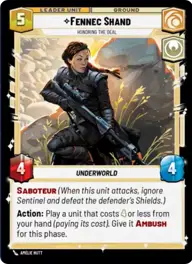
Fennec Shand, Honoring the Deal

Spice Mines

Decklist


Try on ForceTable

Try on Karabast

Print Proxies

Export to TTS

Export to image

Ground units (42)

2 x
1
Criminal Muscle
2 x
2
House Kast Soldier
2 x
2
Cloud-Rider
2 x
2
L3-37, Droid Revolutionary
1 x
2
Ketsu Onyo, Old Friend
2 x
2
Heroic Renegade
2 x
2
Fugitive Wookiee
2 x
3
Liberated Slaves
2 x
3
Cassian Andor, Rebellions are built on Hope
2 x
3
Nite Owl Skirmisher
1 x
3
Coruscant Dissident
2 x
4
Principled Outlaw
2 x
4
Hunting Nexu
1 x
5
Clan Challengers

Space units (21)

3 x
1
Cartel Turncoat
1 x
2
Unlicensed Headhunter
1 x
2
Privateer Scyk
1 x
2
Green Squadron A-Wing
2 x
3
Disabling Fang Fighter
1 x
4
Valiant Assault Ship
1 x
5
Desperado Freighter

Events (24)

1 x
0
Look the Other Way
2 x
0
Medal Ceremony
1 x
1
Disarm
1 x
1
Daring Raid
2 x
2
Surprise Strike
1 x
2
This Is The Way
2 x
3
Waylay
1 x
5
Bravado

Upgrades (9)

1 x
2
Jetpack
2 x
2
Death Mark
1 x
2
Armed to the Teeth

0 comments

You must be logged in to add comments.

Print Proxies

Here you can choose the format that the proxies should be printed in. Make sure to support your local game store!

Export to TTS

There are multiple ways to export to TTS. Here, we'll explain how they work and how you can use them.

1. Import as TTS object.

Download the JSON file using the following button. Place this file in your TTS Saved Objects folder. After this, you'll be able to spawn your deck in the Components UI.

Download saved object

2. Import within SWU mod.

Within some of the Star Wars Unlimited mods on TTS, you are able to import a deck by using the Deck Builder. You can import your deck by clicking on the buttom below to copy your json and then paste it in the Deck Builder to spawn your deck.

Copy to clipboard